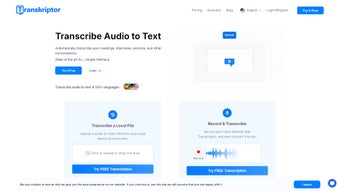

Download Transkriptor – Fast AI‑Powered Audio and Video Transcription Tool
Overview
Transkriptor is a cloud‑based, AI‑driven transcription service that converts audio and video recordings into searchable, editable text in seconds. Built for professionals, educators, podcasters, and anyone who needs reliable speech‑to‑text conversion, the platform supports more than 40 languages and dialects, making it a truly global solution. The workflow is intentionally simple: upload a file, select the source language, and let the AI engine handle the rest.
In addition to raw transcripts, Transkriptor offers an AI‑powered meeting‑notes assistant that extracts key points, action items, and concise summaries, allowing teams to focus on discussion rather than note‑taking. Because the entire process runs in the browser, there is no heavy desktop client to install, and the service works on any modern operating system. Security is a core priority, with TLS 1.3 encryption, GDPR‑compliant data handling, and automatic deletion of files after processing.
Whether you are transcribing a 30‑minute Zoom call, a multi‑hour conference session, or a short podcast episode, Transkriptor promises speed, accuracy, and a cost‑effective alternative to manual transcription or expensive human services.
Key Features
- AI‑driven transcription engine with support for 40+ languages and dialects.
- Automatic speaker identification and timestamps for easy navigation.
- Meeting‑notes assistant that generates summaries, action items, and highlights.
- One‑click export to TXT, DOCX, PDF, SRT, and CSV formats.
- Secure, encrypted uploads with GDPR‑compliant data handling.
- Real‑time collaboration – share a transcript link for instant feedback.
- Custom vocabulary import to improve accuracy for industry‑specific terminology.
- Integrations with Google Drive, Dropbox, and OneDrive.
- Browser‑based – no software download required, works on any modern OS.
- Free tier provides up to 30 minutes of transcription per month.
Why the AI Engine Stands Out
The core of Transkriptor is a deep‑learning model trained on millions of hours of spoken content. It excels at handling background noise, overlapping speech, and diverse accents—challenges that often trip up conventional tools. Continuous learning from user corrections means the model becomes more accurate over time. The meeting‑notes assistant goes a step further by applying natural‑language understanding to extract meaning, not just words, identifying decisions, deadlines, and sentiment to give teams a concise briefing without reading the full transcript.
Export Options Tailored for Different Workflows
After transcription, users can download a clean DOCX for editing, an SRT file for subtitle creation, or a CSV with timestamps and speaker tags for data analysis. Batch processing lets you upload multiple files and receive a zip archive of all results, eliminating the need for third‑party converters and streamlining post‑production pipelines.
Installation & How to Use Transkriptor
As a web‑based service, Transkriptor requires no traditional installation. Follow these steps to start transcribing within minutes:
Step 1 – Create Your Account
Visit Transkriptor.com, click “Sign Up,” and register with an email address or single sign‑on (Google or Microsoft). After confirming your email, you’ll land on a dashboard showing remaining free minutes and recent projects.
Step 2 – Upload Your Audio or Video File
Click “New Transcription,” then drag‑drop or browse to select your file. Supported formats include MP3, WAV, MP4, MOV, and many others. The platform automatically detects duration and warns you if it exceeds the limits of your current plan.
Step 3 – Choose Language and Settings
Select the source language from a dropdown. For specialized terminology, upload a custom vocabulary list (TXT or CSV) to boost accuracy. Speaker diarization and timestamps are enabled by default but can be toggled.
Step 4 – Let the AI Work
Press “Start Transcription.” The AI processes the file in the cloud, and you can monitor progress via a real‑time progress bar. Longer files trigger an email notification once the transcript is ready.
Step 5 – Review, Edit, and Export
The generated transcript appears in an interactive editor with built‑in spell‑check and speaker labels. Make corrections, add comments, or highlight sections for teammates. When satisfied, click “Export” and choose the desired format. Files download instantly or can be saved directly to linked cloud storage.
Tips for Faster, More Accurate Results
- Use high‑quality recordings to reduce background‑noise errors.
- Separate speakers into distinct tracks when possible to improve diarization.
- Leverage custom vocabulary for industry jargon, product names, or acronyms.
- Utilize the meeting‑notes assistant for quick summaries without reading the full transcript.
Compatibility, Pros & Cons, FAQ & Conclusion
Transkriptor runs entirely in modern web browsers, making it compatible with Windows 10/11, macOS 10.15+, Linux, Android 8.0+, and iOS 13+. No plugins or extensions are required, and the service works seamlessly on Chrome, Firefox, Edge, and Safari. Because processing occurs on secure cloud servers, even low‑end devices can upload and retrieve transcripts quickly.
Pros
- Speed: Most transcripts finish within minutes, even for hour‑long recordings.
- Accuracy: Handles multiple speakers, accents, and background noise with high precision.
- Language Coverage: Over 40 languages and dialects for global teams.
- AI Meeting‑Notes: Automatic summarization saves time and improves knowledge sharing.
- Security: End‑to‑end encryption and GDPR compliance protect sensitive data.
- Flexible Export: Multiple file formats cater to writers, editors, and developers.
- Free Tier: 30 minutes of transcription per month without a credit card.
Cons
- Internet Dependency: Requires a stable connection; no offline mode.
- Cost for Heavy Users: Per‑minute pricing can add up for large enterprises.
- Learning Curve for Advanced Settings: Custom vocabularies and API integration need some technical knowledge.
- Limited Real‑Time Transcription: Not a live captioning solution for streaming events.
Frequently Asked Questions
How secure is my data when using Transkriptor?
Transkriptor encrypts all file uploads and downloads using TLS 1.3. Files are stored temporarily on secure servers and automatically deleted after processing unless you choose to save them to your account. The service complies with GDPR, CCPA, and ISO 27001 standards, ensuring that personal and confidential information remains protected.
Can I transcribe live meetings or webinars?
Transkriptor currently processes pre‑recorded audio and video files. For live captioning, you would need to record the session first, then upload the file. A real‑time streaming API is planned for a future release.
What file formats are supported for upload?
Common audio formats (MP3, WAV, AAC, OGG) and video formats (MP4, MOV, AVI, MKV) are all supported. If you have an uncommon format, you can convert it using a free tool like HandBrake before uploading.
Is there a limit to the length of a single transcription?
The free tier caps each file at 30 minutes. Paid plans raise the limit to 4 hours per upload, and enterprise contracts can negotiate custom limits.
Do I need to install any plugins or software on my computer?
No. Transkriptor runs entirely in the browser, so there is nothing to download or install. All processing happens on Transkriptor’s secure cloud infrastructure.
Conclusion & Call to Action
Transkriptor delivers a compelling mix of speed, multilingual capability, and AI‑enhanced note‑taking that makes it a standout choice for anyone who regularly works with spoken content. Its web‑only architecture eliminates the hassle of installations while offering strong security guarantees for sensitive data. Although it relies on an internet connection and may become costly for very high‑volume users, the free tier and transparent pricing make it accessible for freelancers, educators, and small teams. If you’re looking to replace manual typing, reduce transcription costs, or simply obtain quick, accurate meeting summaries, Transkriptor is a reliable, modern solution.
Ready to try it out? Create your free account today, upload a short audio clip, and experience how AI can transform your workflow in minutes.



.png)



